
Your system stays as it is
It needs no knowledge of Peppol, UBL or encryption.
Asseco Solutions · Helios · Peppol
Connect Helios, SAP, KROS or any other system to the Peppol network and the Slovak Financial Administration without changing its code. Issue and receive e-invoices even before e-invoicing becomes mandatory in Slovakia on 1 January 2027.
1 Jan 2027
mandatory e-invoicing for VAT payers in Slovakia
0
open ports — outbound HTTPS 443 only
128 MB
of RAM is enough to run the Agent as a service
4 channels
disk · SFTP · REST API · database
01 · What APEX Agent connects
Your accounting or enterprise software stays exactly as it is. APEX Agent connects it to the Peppol network and the Slovak Financial Administration.
Your systems
Click a system to see how it connects.
… and any other system that can save a document to disk or SFTP, send it via REST API, or keeps it in a database.
HELIOS = Asseco Solutions' own product
4 connection methods
APEX Agent exchanges documents with your system in one of four ways. Pick a system above to see which one we recommend.
List of systems based on implementations to date. Product names are trademarks of their respective owners.
How it works
The Agent runs on your premises. It takes a document from your system, translates it into the Peppol format and securely hands it over to the Asseco Solutions cloud.

On-site · internal network
document exchange
Asseco Solutions · cloud
Peppol network and government
It needs no knowledge of Peppol, UBL or encryption.
The Agent only communicates outbound via HTTPS 443.
Each company has its own Peppol identity.
After an outage, it retries sending and returns the status to your system.
Formats
No need to rework your system's output. You set the format in the APEX Agent mapping profile — and it works in both directions.

What your system sends
Set up in the Agent interface, separately for each company (tenant). No programming on your system's side.
What goes into the Peppol network
In both directions: the Agent translates received UBL e-invoices into the format you configure for your system.
Setup
Three things on your side. Asseco Solutions takes care of the rest — network registration, access verification and reporting.
A Windows server on which the Agent runs as a service (Linux with manual installation).
One channel per company and a service account with read and write permissions.
Registration in the Peppol network for each company. Access credentials are issued by Asseco Solutions.
The Agent keeps processed records for 30 days and then deletes them automatically. Companies' access credentials are stored encrypted.
02 · Configuration and monitoring
A single tool tracks all documents travelling in both directions between your system and the Peppol network.
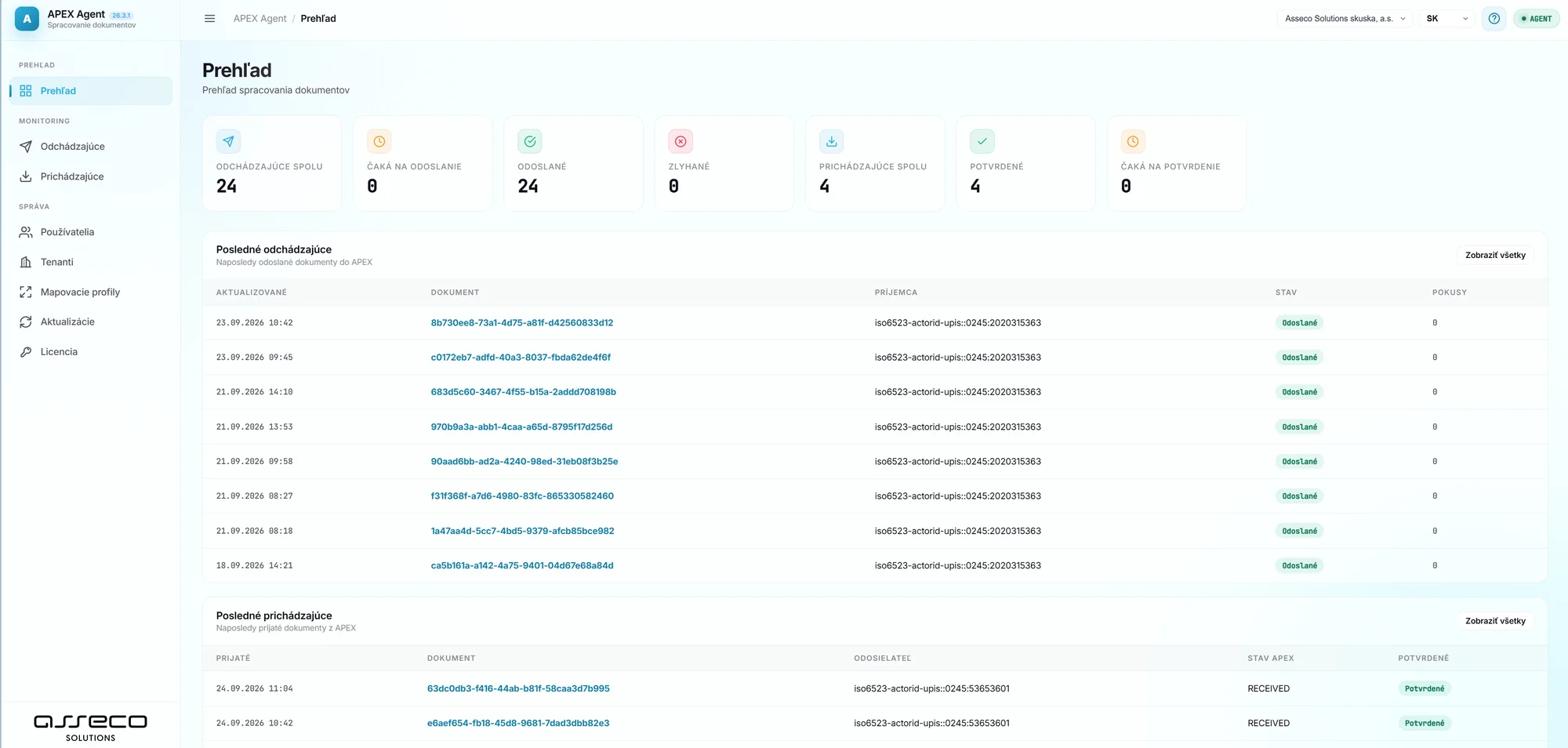
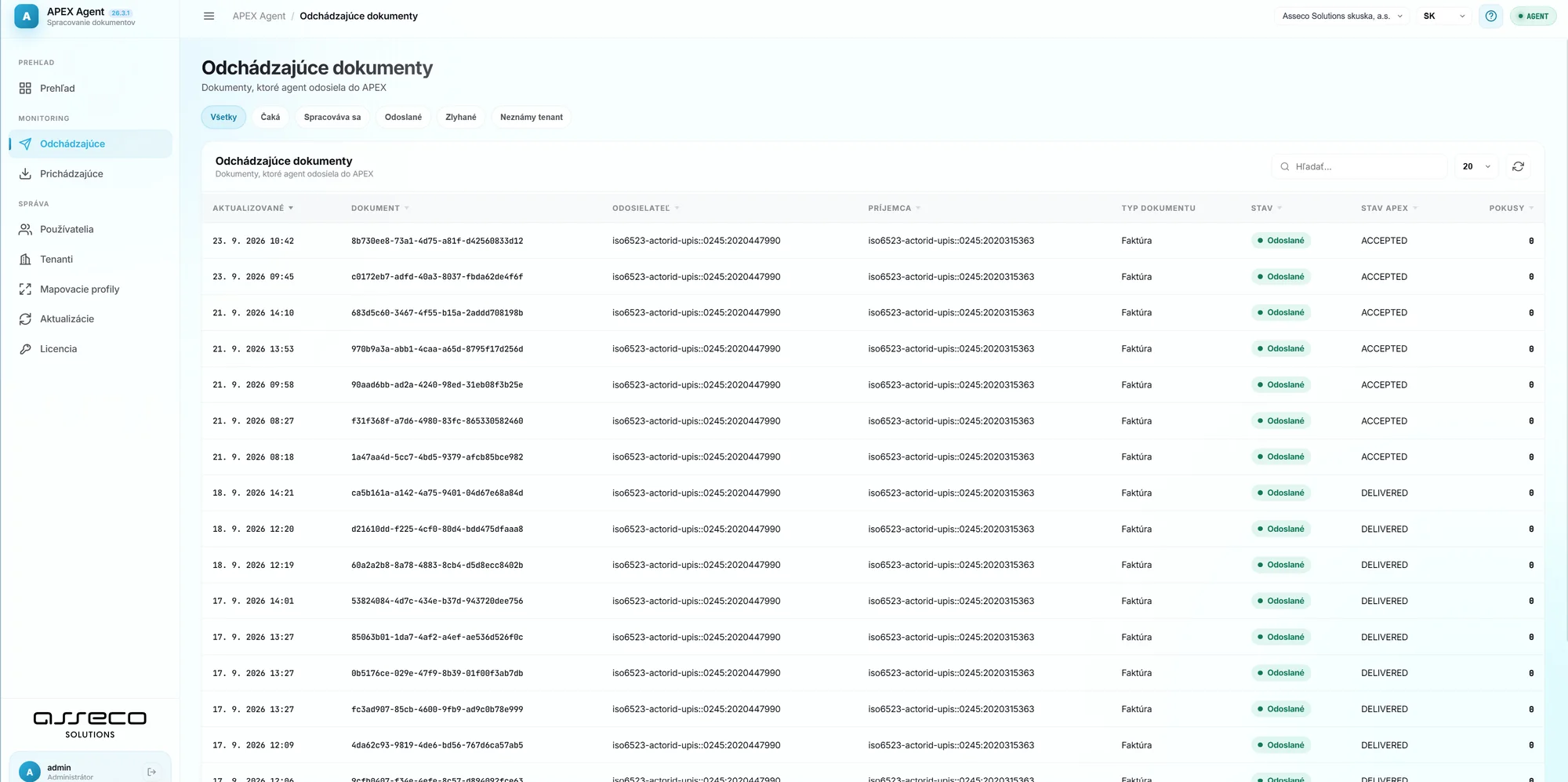
ACCEPTED → DELIVERED — the invoice has reached the recipient.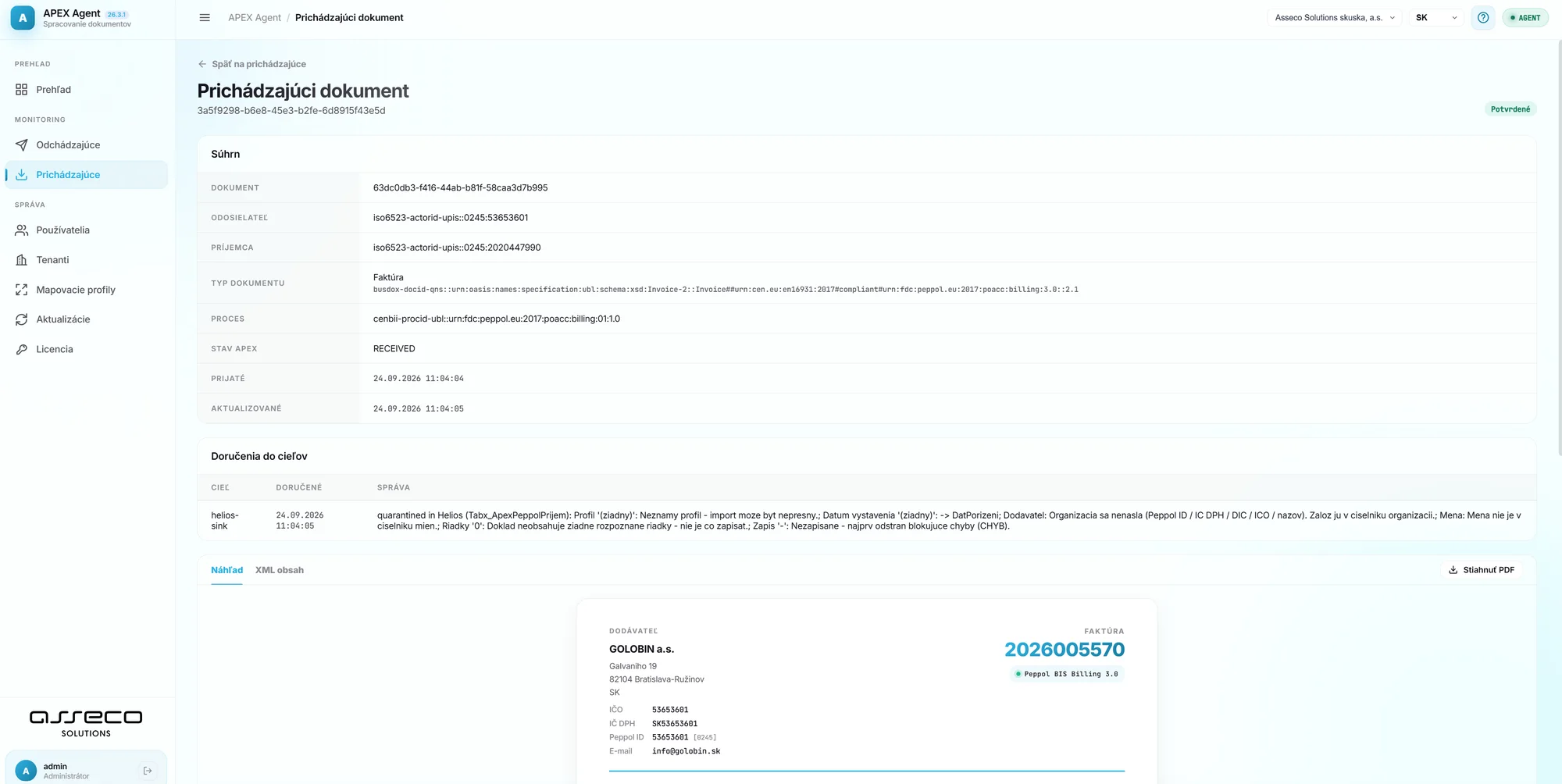
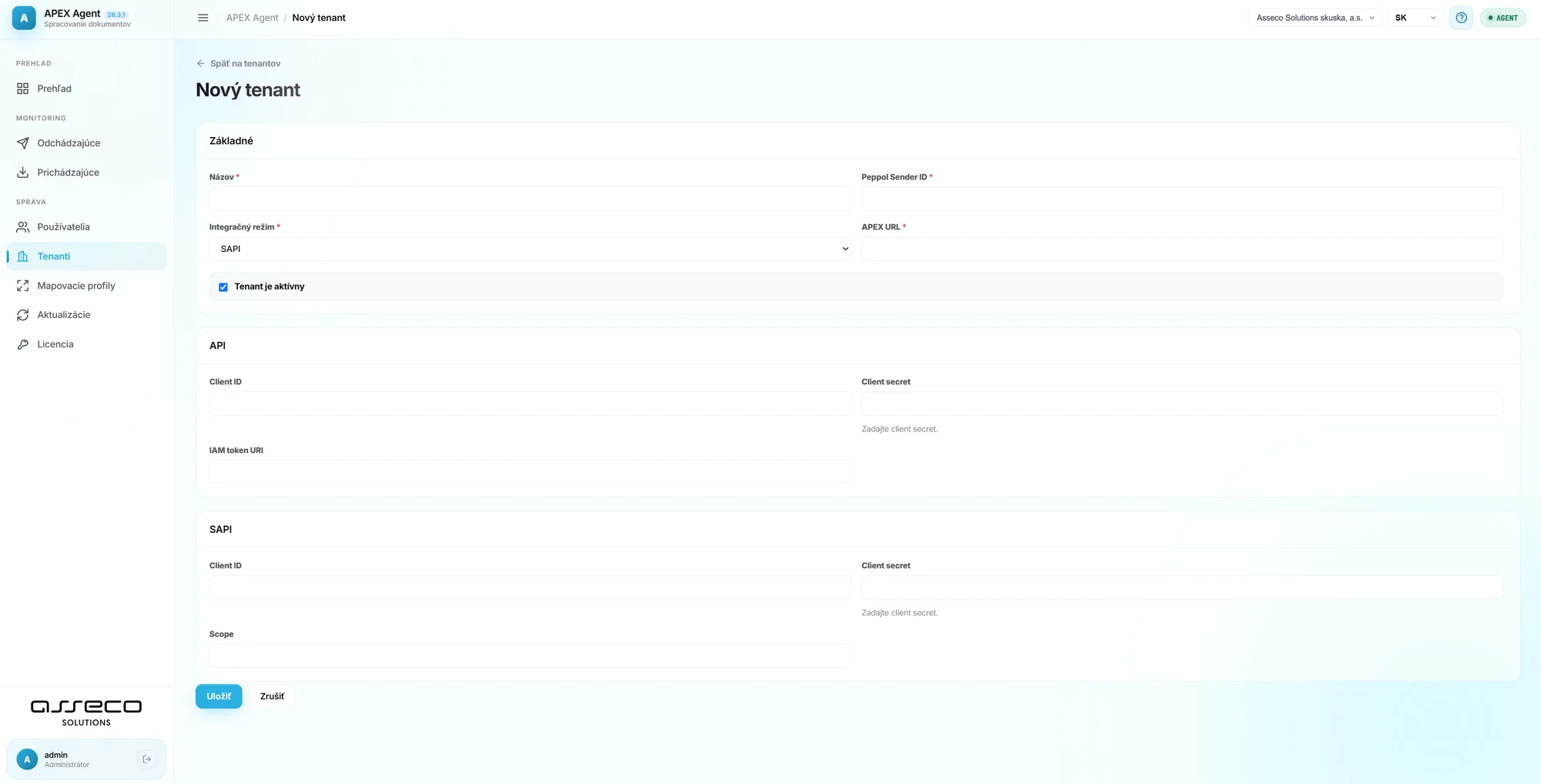
Configuration · step 1
A tenant is a company connected to Peppol. Every entity that sends or receives e-invoices via APEX Agent has its own record with a Peppol Sender ID.
Required details when creating a tenant
Configuration · step 2
Each user of APEX Agent has their own account with defined permissions and assignment to specific tenants.
Required and optional account details
03 · Invoices in Helios
A standard domestic invoice is issued as before and sent to APEX Agent in a single step.
Customer, dates, currency, document number, payment method, IBAN.
Quantity, unit of measure, unit price, VAT rate.
Action eFaktúra → Export efaktúry do Peppol (export e-invoice to Peppol)
The document appears among the outgoing documents in APEX Agent — and the Agent sends it to the Peppol network.
E-INVOICE
FA-2027-001
Mandatory fields
Peppol BIS Billing 3.0 / EN 16931 (UBL) — a missing field means the document is rejected or quarantined.

| Field (BT) | What it contains | Example from Helios |
|---|---|---|
BT-1 / BT-2 | Invoice number and issue date | 2002600054 · 23 Sep 2026 |
BT-3 | Document type (380 invoice, 381 credit note, 383 debit note…) | 380 — Invoice |
BT-5 | Document currency | EUR |
BT-27, BT-31, BT-44, BT-48 | Name, address and VAT ID of both the supplier and the customer | Supplier → Customer |
EndpointID | Electronic (Peppol) address of both parties | iso6523-actorid-upis::0245:2020447990 |
InvoiceLine | At least one line with quantity, price and VAT rate | 1 pc · €10.00 · 23% VAT |
BT-106 – BT-115 | Totals of the taxable amount, VAT and amount including VAT must be mathematically consistent | €10.00 + €2.30 = €12.30 |
PaymentMeans | Payment details | IBAN, payment method |
The exact mapping to SK CIUS and Peppol BIS Billing 3.0 is described in the Helios iNuvio documentation — E-Faktúra (SK), new obligations from 1 January 2027.
Received invoices
Today
Today, received e-invoices reach Helios through the generic General Imports module (Všeobecné importy).
In development
A new window in Helios modelled on the QASIDA solution, with subsequent import into the Supplier Invoices module (Dodávateľské faktúry).
04 · Deployment scenarios
See how e-invoicing fits into your environment — from connecting your system directly to multiple sources and forwarding to your accountant.
Scenario 01 · Direct integration
You have one accounting or enterprise system that issues all your invoices. Sending runs automatically via APEX Agent or the REST API — no manual work.
Scenario 02 · Multiple systems
Do you have several systems, not all of them Peppol-ready? QASIDA Invoice Manager brings together input from your ERP, e-shop, Excel or manually entered invoices and sends it all through a single channel.
Scenario 03 · External accountant
In Invoice Manager, you mark which sent or received invoices should go to your external accountant — via Peppol, an API connection to their system or direct access.
QASIDA Invoice Manager
Issue, receive, approve and send e-invoices directly in your browser. For companies without an ERP and as a central hub for multiple systems.
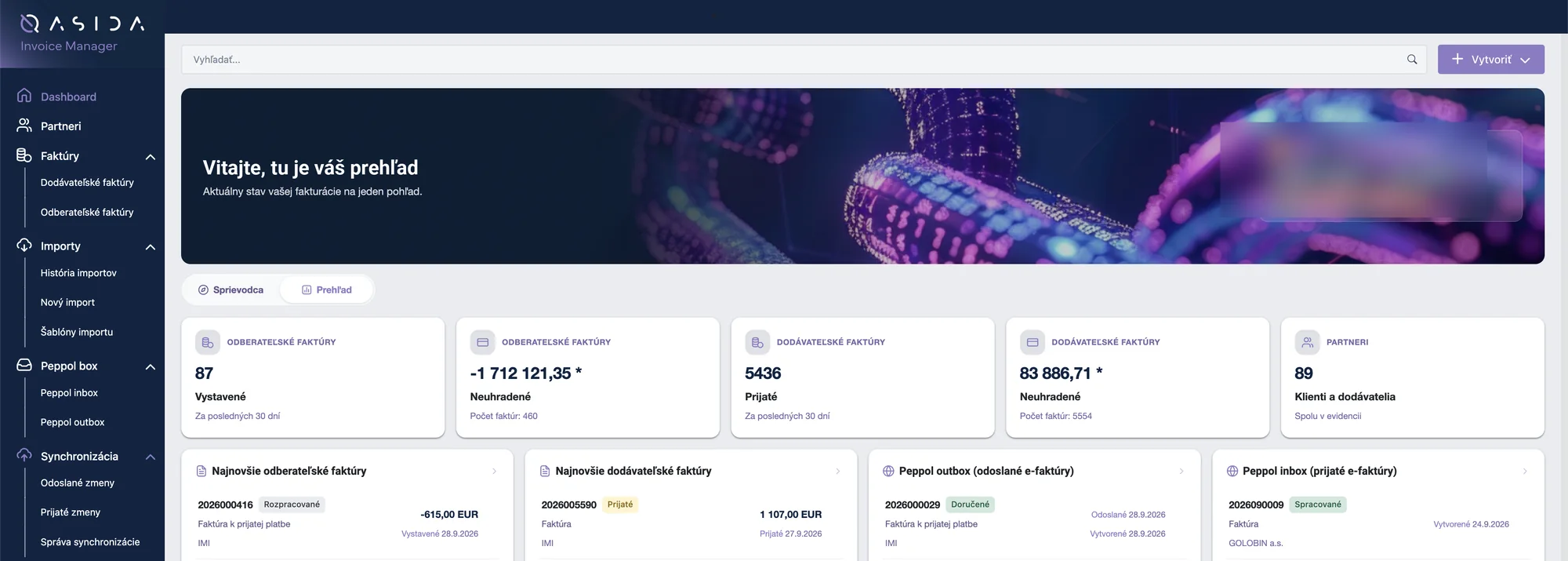
The whole invoice lifecycle in one place — from issue through approval to payment.
Invoices, advance invoices, credit notes and settlement invoices. Follow-up documents are created without retyping.
Via Peppol, by email, by post, or issue without sending. Advance invoices are not sent via Peppol.
Invoices from Peppol arrive protected against changes. Approval is driven by a workflow with assignment to a colleague.
Enter a name or company ID and the details are filled in from the register. The Peppol ID (0245 + DIČ) is pre-filled.
Payments, invoice statuses and the full history in the Activity tab. PDF preview at any time.
The assistant helps you right in the app (Ctrl + I). Switch between companies and languages with a single click.
Source: QASIDA Invoice Manager user guide — wiki.assecosolutions.sk
05 · Summary
Q2 2026 – Dec 2026
Voluntary phase — testing the sending and receiving of e-invoices
1 Jan 2027
Mandatory for VAT payers — domestic B2B / B2G supplies
1 Jul 2030
Extended to all taxable persons and cross-border supplies
EN 16931 / UBL 2.1, Peppol BIS Billing 3.0 profile, transmission via the Peppol network (five-corner model).
Up to €10,000 for a first breach, up to €100,000 for repeated breaches (Section 85o of the Slovak VAT Act).
Source: Helios iNuvio — E-Faktúra (SK), new obligations from 1 January 2027 · public.helios.eu/inuvio
Choosing a partner
Six criteria worth basing your decision on — and we meet every one of them.

We are not a start-up created just to be a digital postman.
Quality tools that go beyond invoice delivery itself.
Compliance with the Peppol network — ISO 27001, NIS2 support.
We build connections to other EU countries before they become mandatory.
We develop our own accounting and enterprise software (ERP).
A local team in Slovakia, no foreign call centres.
You designate your digital postman on the portal of the Financial Administration of the Slovak Republic and can change it in future — you are not tied in for good.
Pricing
Monthly flat fees, prices excl. VAT.
One monthly fee and everything you need to connect your system to the Peppol network.
| What you get | APEX Agent€75 / mo. |
|---|---|
| Connectivity | |
| 4 connection methodsDisk, SFTP, REST API or a direct database connection to your system | Included |
| Multiple companies in one AgentEach company (tenant) has its own Peppol identity | Included |
| Runs on-site, in your networkService on a Windows server (Linux with manual installation), 128 MB RAM | Included |
| No open portsOutbound-only communication over HTTPS 443 | Included |
| Formats and mapping | |
| Mapping profilesIDoc, ISDOC, EDIFACT → UBL 2.1 / Peppol BIS Billing 3.0 | Included |
| Both directionsReceived e-invoices converted to your system's format | Included |
| No programmingSet the format in the Agent's interface, separately for each company | Included |
| Delivery and compliance | |
| Sending and receiving via PeppolCustomers and suppliers at home and abroad | Included |
| Automatic TDD reportReporting to the Slovak Financial Administration without your involvement | Included |
| EN 16931 validationChecked in the certified APEX Access Point | Included |
| Reliable deliveryRetries after an outage and returns the status to your system | Included |
| Monitoring and administration | |
| Agent web interfaceOverview, outgoing and incoming documents with status | Included |
| Invoice and XML previewDocument detail in one click | Included |
| Quarantine with exact reasonYou know why a document failed and what to fix | Included |
| Users and permissionsUser / Administrator roles, assignment to companies | Included |
| Agent updatesVersion management right in the Agent's interface | Included |
| Security and support | |
| Encrypted credentialsCompany access credentials are stored encrypted | Included |
| Automatic record deletionProcessed records are deleted after 30 days | Included |
| Peppol network registrationPeppol identity and credentials provided by Asseco Solutions | Included |
| Asseco Solutions supportLocal team in Slovakia | Included |
E-invoice delivery is charged according to the Digital postman package you choose below.
Technology for business, solutions for people.
Our experts will guide you through installing APEX Agent, registering in the network and sending your first e-invoice.